The buttons at the top of the Table Editor are described below as seen from left to right:
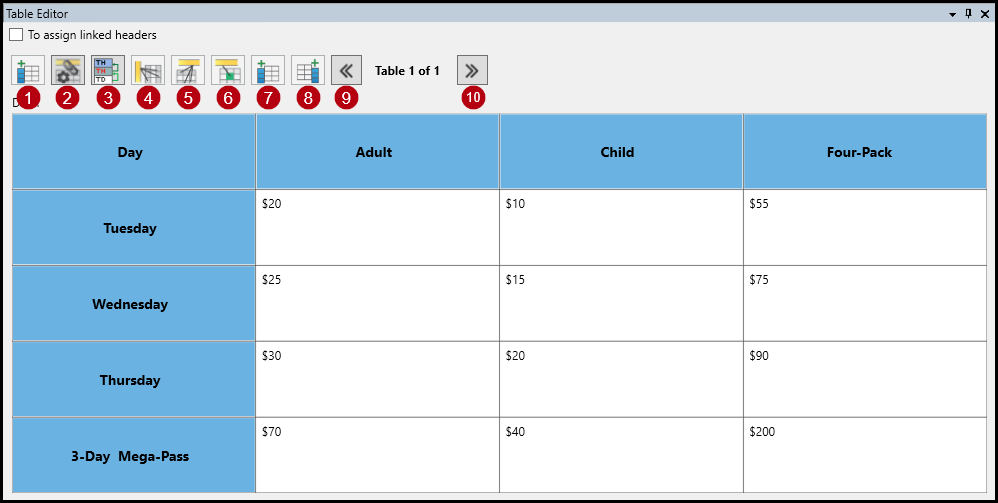
- Insert Cells: Enables the user to add any number of cells before or after the selected cell.
- Generate One Level Linked Headers: After the necessary cells have been tagged as TH cells and assigned the proper scope, this button will automatically link the data cells to the closest column and row headers (based on header scope). Certain standards require this linking for complex tables.
- Generate Recursive Linked Headers: After the necessary cells have been tagged as TH cells and assigned the proper scope, this button will automatically link the data cells to all associated column and row headers (based on header scope). Certain standards require this linking for complex tables. Note: This is not best practice, as it causes some assistive technology to read some table components multiple times. CommonLook encourages the use of the "Generate One-Level Linked Headers" button (2) for complex table linking.
- Convert to TH and Assign the Scope of Row: This button will convert selected cells to TH and assign the scope of row (making the cells row headers) all in one step. If a cell is already tagged as a TH, the scope of row will still be applied when using this button.
- Convert to TH and Assign the Scope of Column: This button will convert selected cells to TH and assign the scope of column (making the cells column headers) all in one step. If a cell is already tagged as a TH, the scope of column will still be applied when using this button.
- Convert to TD: Changes selected cells that were tagged to data cells. There is no scope is assigned to data cells.
- Insert Cell Before: Enables the user to add one cell before the selected cell.
- Insert Cell After: Enables the user to add one cell after the selected cell.
- Previous Table: Use this button to work on a previous table in the document.
- Next Table: Use this button to skip to the next table in the document.
Didn't find what you're looking for? Navigate to our "Tables" section for more related articles that may help!
Was this article helpful?
That’s Great!
Thank you for your feedback
Sorry! We couldn't be helpful
Thank you for your feedback
Feedback sent
We appreciate your effort and will try to fix the article