There seems to be a lot of confusion regarding “Annotation tags,” Annotations, and Annot tags. We’ll try to clear some things up.
Annotations, OBJRs, and “Annotation tags”
In a PDF, an “Annotation,” or an “Object Reference” (OBJR) is an interactive “thing.” For links, it’s the “clickable” part that allows you to follow the link. In forms, it’s the form field - the text field, checkbox, etc. - where you put your “answer” to a question. Annotations, however, are not tags. The confusion arises, then, because of how they look in the Tags trees in Acrobat and CL PDF. Their icons make them look like tags, even though they aren’t. Thanks Acrobat. (And we can’t change that, in CL PDF, because we are plugged into Acrobat. So, unfortunately, our hands are tied.)
Here is a screenshot of a link Annotation (OBJR) in the tags in Acrobat.
Here is a screenshot of a link Annotation in Acrobat: 
Here is a screenshot of the same link Annotation in CL PDF: 
That said, because Annotations are not tags, they need to go in tags. Link Annotations go in Link tags, form (or “Widget” Annotations) go in Form tags.
Also, because the Annotation is not a tag, in CL PDF you cannot convert it to a different tag type.
Creating Annotations in your document
It’s important to note that, in CL PDF, you cannot create Annotations. Remember, an Annotation is not a tag (even though the icon makes it look that way). An Annotation is functional content in a document. And, in CL PDF, you cannot add or remove content. So, if you want to have an Annotation in your document, and you don’t have one, you need to exit CL PDF and, in Acrobat, add the link, form, etc., that you want. You’ll then be able to tag it in CL PDF.
So, keep in mind, adding a Link, Form, (or Annot tag - discussed next) does not automatically add that functionality to the PDF.
Annot Tags
So, when should you use the Annot tag? As mentioned, link Annotations go in Link tags. Form (widget) Annotations go in Form tags. “Other” types of Annotations go in Annot tags. “Other” types of annotations could be, for example, Highlight annotations, Popup annotations, or Comment annotations.
To tag these “other” types of Annotations, select the Annotation and, in CL PDF, go to the Insert tag tab. From there, navigate about halfway across the ribbon to the “Other tags” group and expand the dropdown menu for “Standard tags.” In that dropdown menu, choose Annot.”

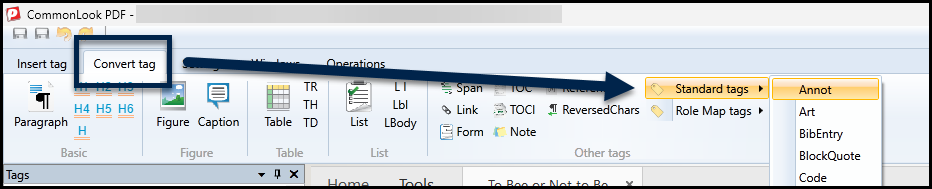
Of course, if your “other” (type) Annotation is already in a tag, but it’s in the wrong tag type, you may choose to simply convert the tag that’s containing the Annotation. Conveniently, you can also find the Annot tag in the same location from the Convert tag tab in CL PDF.
Didn't find what you're looking for? Navigate to our "Links" or "Forms" sections for more related articles that may help!
Was this article helpful?
That’s Great!
Thank you for your feedback
Sorry! We couldn't be helpful
Thank you for your feedback
Feedback sent
We appreciate your effort and will try to fix the article