Documents that contain Links and Forms need to have the tabbing order set to follow the document’s structure. This is to ensure that as someone is navigating through the document by pressing the Tab key, they proceed in the same logical sequence in which the tags are arranged. To force the tab order to follow the document’s structure, follow these steps:
Tip: Make sure (in the Settings tab on the ribbon) that “Untagged” is checked in the Selection group. 
- Open the Untagged Content panel. (Click the tab labeled “Untagged Content” below the Tags tree.)
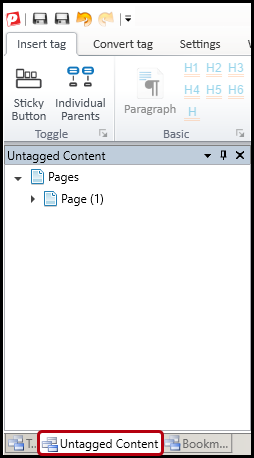
- Select the page(s) in the document.
Note: When the Untagged Content panel is open, there will be one icon labeled “Pages” with an arrow next to it. Open the Pages icon to reveal the specific document pages (they will be numbered). Then, select those numbered pages. Remember that holding down the Ctrl or Shift key allows the user to multi-select.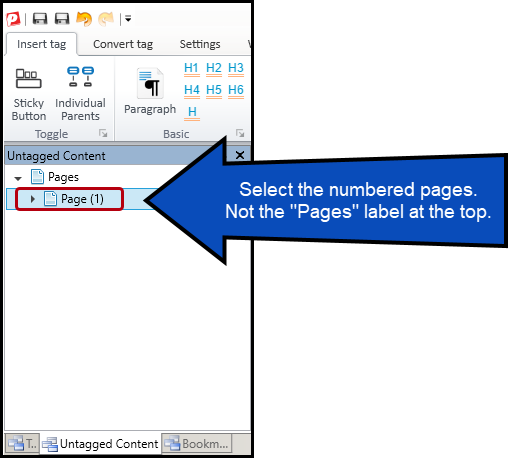
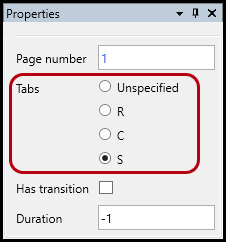
- In the Properties panel (on the lower right side of the CommonLook interface) select the radio button labeled “S” (“S” stands for “Structure”).
Note: Not having a tabbing order set during document remediation will result in a Failure during your Verification phase. You can also use the Fix Wizard to resolve this issue rather than follow the steps above to do so manually.
Didn't find what you're looking for? Navigate to our "Links" section for more related articles that may help!
Was this article helpful?
That’s Great!
Thank you for your feedback
Sorry! We couldn't be helpful
Thank you for your feedback
Feedback sent
We appreciate your effort and will try to fix the article