Because screen readers read from the Tags, content that is untagged (also referred to as being "artifacted") will not be read by screen readers.
Why Artifact (untag) Content?
Decorative images, background colors (shading, etc.), cell borders in data tables, and other elements on the page that don't convey any important information don't need to be tagged and read by screen readers and other assistive technology.
What about running headers, footers, page numbers, etc., that repeat on every page?
If you've got content in a header or footer that repeats on every page, you want to tag it once so that it's read one time but, other than that, running headers and footers should be artifacted. Refer to Headers, Footers, and Pagination Artifacts for more information.
How to Artifact Content
There are two ways to artifact (or untag) content:
- Highlight the content in the physical view and press the Delete key
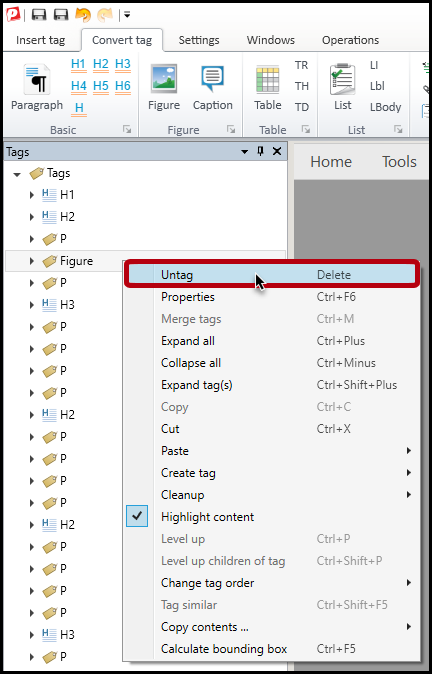
- Select the tag in the Tags tree and press the Delete key
Alternatively, right-clicking on a tag to bring up the context menu and then choosing “Untag” will have the same result. Untagging content will not delete it from the physical view of the document.
When artifacting content, if empty tags are left behind in the Tags tree, be sure to run a "Cleanup" to remove the empty tags. For more information, refer to the article on "Cleaning Up Empty Tags (Desktop & Advanced Editors)."
Didn't find what you're looking for? Navigate to our "Tagging (or Untagging) Content" section for more related articles that may help!
Was this article helpful?
That’s Great!
Thank you for your feedback
Sorry! We couldn't be helpful
Thank you for your feedback
Feedback sent
We appreciate your effort and will try to fix the article