After the document has been remediated, users will need to add a Document tag to the project. Essentially, this conveys the information, “This is a full and complete document.” Doing this after remediation, but before the validation check is the most efficient order to complete this action.
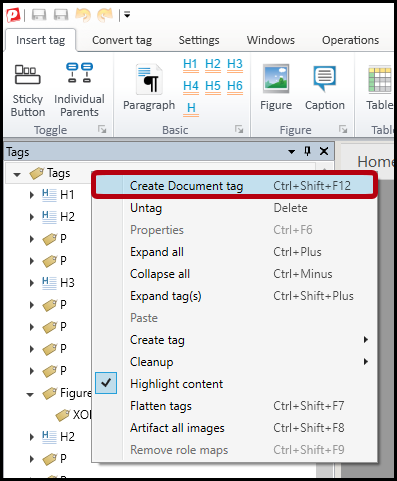
- Right-click (or otherwise open the context menu) on the Tags root
- Select the "Create Document Tag" option.
Didn't find what you're looking for? Navigate to our "Tagging (or Untagging) Content" section for more related articles that may help!
Was this article helpful?
That’s Great!
Thank you for your feedback
Sorry! We couldn't be helpful
Thank you for your feedback
Feedback sent
We appreciate your effort and will try to fix the article