A common question we get is surrounding the Warning result that reads, “CommonLook created 3 (or any number) artifacts to hold untagged text/graphical element.”
Why does this warning occur?
You will receive this warning when content in the document has been untagged, or "artifacted." Warnings are results that CommonLook wants you to be aware of, but are not direct violations of the standard. Wen this warning comes up, it's CommonLook telling you that content has been artifacted and it's asking you that's ok. For example, in the screenshot below, the Warning is letting me know that one artifact container has been created. I can pass this warning because when remediating the document, I intentionally untagged, or artifacted, the Figure tag that was originally holding the decorative lines.
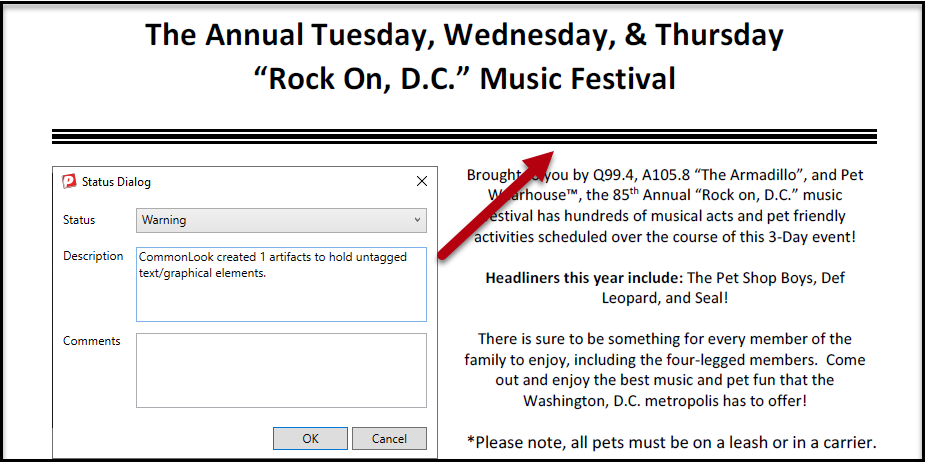
If you're following the recommended workflow of navigating through the tags in the PDF first, and then running your verification, when you get this warning it should not be terribly alarming. While you were checking the tags, if you found something, like the decorative lines we mentioned above, and untagged it, then you know that the artifact container has been intentionally created. Similarly, if you're checking the tags prior to verification then you should be making sure that everything that should be tagged has been. Then, when you're told content has been untagged, and placed in Artifact containers, you will have already verified that this is ok.
Of course, if you're not following the recommended workflow of checking the tags (and fixing any issues you find) prior to running your verification, and you simply run your check and then you get this warning, you'd need to re-check the tags tree, and the Artifacts in the Untagged Content panel, to see if anything important has been left out of the tags tree. If so, tag the important information with the appropriate tag and then re-run the standards check.
Was this article helpful?
That’s Great!
Thank you for your feedback
Sorry! We couldn't be helpful
Thank you for your feedback
Feedback sent
We appreciate your effort and will try to fix the article