Overview
Footnotes (and endnotes) are comprised of two separate parts. The first part is the superscript number, letter, or symbol that occurs in the main “body” of the document, whether it's in a paragraph, list, table, etc. The second part of the footnote (or endnote) is the text at the bottom of the page (or, with endnotes, at the end of the document) which the superscript number, letter, etc., is referring to.
Prerequisites
Determine if your PDF has either footnotes or endnotes.
Steps to Follow
There are two parts to correctly tagging Footnotes and Endnotes:
Part 1: Tagging the reference
1. Select the superscript number, letter, symbol, etc, in the physical view if the document or inside of the tags tree.
2. With the Insert Tag tab/button selected, choose the reference tag in the Other Tags group.
3. Do not push the reference tag. It should remain inside of the tag that is holding the referenced text.
The screenshot below shows the reference number "1" in a Reference tag in the Tags tree and highlighted in the physical view. Notice that the Reference tag is inside a Paragraph tag, too.

Part 2: Tagging the "note"
1. Seclect the entire footnote or endnote in the physical view.
2. With the Insert Tag tab/button selected, choose the Note tag button in the Other Tags group.
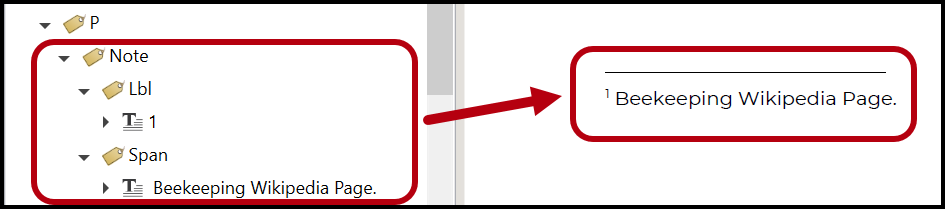
3. Next, in the tags tree or in the physical view, select the number (letter, or symbol) and place that in a Label (Lbl) tag.
4. Lastly, select the text portion of the footnote or endnote in a Span tag.
screenshotThe screen shot below shows both of these tags, the Lbl and the Span, are then nested inside a Note tag
Accessibility Requirments
Various standards have different requirements for tagging Notes. The WCAG standards, for example (both 2.0 and 2.1) do not require Lbl or Span tag use inside the Note tags. PDF/UA requires the Lbl tag. The Span tag can be helpful for keeping things organized.
Also, notice in the screenshot above, the Note tag is a child of a Paragraph tag. According to ISO 32000-1, Note tags are “Inline-Level Structure Elements” so they need to go in some sort of “Block-Level” element (like a P). However, according to PDF/UA, its “placement value” can be set to “Block” and, if that’s done, then the Note tag wouldn’t need to be placed inside a P tag. (This is done very easily in CommonLook PDF using the Fix Wizard!)
In addition, PDF/UA requires that each Note tag has a unique ID. (Again, CommonLook PDF will do this quickly and easily for all of your Note tags when using the Fix Wizard!)
Common Problems
If you are going to change the reading order of the note tag, be sure it is placed after the last time it is referenced in the tags tree.
Frequently Asked Questions
Should I adjust the Reading Order for Footnotes and Endnotes?
The mechanics of tagging References and Notes is often the easy part. A more challenging aspect pertaining to foot (or end) notes can be determining the reading order. While departments, agencies, managers, etc. may have specific requirements or guidelines to use when making these reading order decisions, sometimes it comes down to Remediator’s choice. Here are some suggestions and things to consider:
- Place the Note tag in the Tags tree, at the root level, immediately after the Paragraph tag (or List, Table, etc.) in which it is referenced. When a note is being referred to in a list, you could decide to move the Note tag inside the LBody, placing it after the text in the LBody.
- The advantage of this choice is that it places the note text closer in the reading order to where it actually is referred to in the document.
- The disadvantage of using this option: If a footnote is referenced more than once in a document (on a page, in a list or table, etc.), moving it in the reading order after the first instance can present reading order issues when that note is referred to again later. If the same footnote is used to more than once in a document, do not use this option.
- Do not move Note tags inside TH cells in data tables!
- Place the Note tag (at the root level) as the last tag for the page on which it appears in the physical view.
- Use this option if the same footnote is referred to multiple times on the page.
- Caution: If a paragraph, list item, etc. spans across multiple pages, do not break the Paragraph (LBody, List, etc.) tag at the end of one page to insert the Note tag before the page break. Instead, move the Note tag after the Paragraph tag even if it means that, technically, the note will be read on the following page.
- Endnotes: Because endnotes occur at the end of the document, their Note tags should be placed in the Tags tree according to the endnote’s location in the physical view.
What if the Foot (or End) Note Contains a Link?
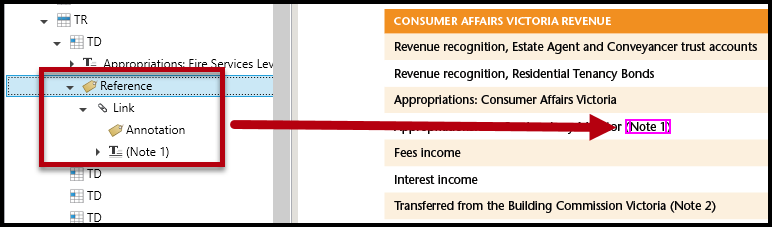
When the footnote or endnote reference is linked to the text at the bottom of the page (or the note at the end of the document) tag the Link correctly and then place it inside the Reference tag (inside the Paragraph, LBody, etc.). Remember that a properly structured Link tag contains both the text for the link and the Annotation. In the screenshot below, the text "Note 1" references, and is linked to, a footnote. The Reference tag contains a Link tag which, in turn, contains the text "Note 1" and the annotation.
Related Articles
How to Create Propert Tagged Links (desktop and advanced editor)
What if the Foot (or End) Note Contains a Link
When the footnote or endnote reference is linked to the text at the bottom of the page (or the note at the end of the document) tag the Link correctly and then place it inside the Reference tag (inside the Paragraph, LBody, etc.). Remember that a properly structured Link tag contains both the text for the link and the Annotation. In the screenshot below, the text "Note 1" references, and is linked to, a footnote. The Reference tag contains a Link tag which, in turn, contains the text "Note 1" and the annotation.
What Screen Readers Will Do
When screen readers, come across a Reference tag, they’ll say “link.” (Because, technically, a Reference is for a link internal to the document.) Unfortunately, this happens even though the reference may not have a link in it. Similarly, if the Reference tag contains an actual link, screen reader users will hear “Link, link.” (Once for the Reference and again for the Link tag.) This is a known issue with screen readers that, hopefully, will be addressed by their developers in the future. Of course, this is also one reason why all of this is being addressed in the next version of the PDF standard.
Didn't find what you're looking for? Navigate to our "Tagging (or Untagging) Content" section for more related articles that may help!
Was this article helpful?
That’s Great!
Thank you for your feedback
Sorry! We couldn't be helpful
Thank you for your feedback
Feedback sent
We appreciate your effort and will try to fix the article