Product
Advanced Editor (Web-based CL PDF)
Feature
Keyboard navigation
Overview
CommonLook PDF is a completely accessible software that is intended for use by all audiences. The software allows individuals who are using assistive technology, such as a screen reader or Braille keyboard, to remediate PDF documents. There are certainly challenges associated with remediating with these limitations - a blind user, for example, would have difficulty remediating a complicated table layout because of their lack of vision, but technically not because of the CommonLook's inaccessibility. In a situation like this, it is not uncommon for a remediator using assistive technology to partner with a colleague who can help them understand the appearance of the document for things like reading order, tagging headings and lists, and verifying the accuracy of Alternative text.
CommonLook has keyboard shortcuts different command within the platform. Everything from adding or removing tags to adjusting metadata can be done without ever using the mouse. These shortcuts include both simultaneous and sequential commands and allow a user to move throughout the CommonLook interface as needed.
Steps to Follow
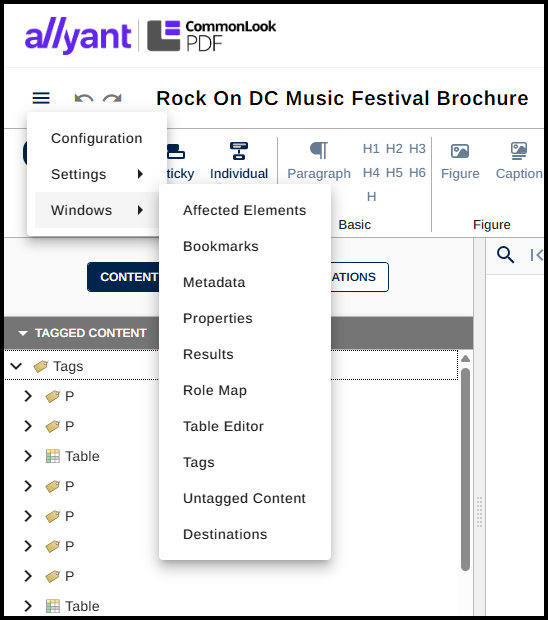
- Using the Tab or Shift & Tab keys, navigate to the "hamburger" menu at the upper left corner
- Press the space bar to open the menu.
- Use the down arrow keys to navigate to Windows and the right arrow key to open the sub-menu.
- In the submenu use the up and down arrow keys to choose and navigate to various panels as needed.
The Quick Access Toolbar
Using the Tab key you can access undo, redo, save and exit in the top menu

- Undo – Reverses the previous remediation step(s) up to the most recent save.
- Redo – Will redo remediation steps that have been incorrectly undone.
- Hide Ribbon - Collapses the ribbon.
- Download file - Download your remediated PDF.
- Save - Saves the changes to your document.
- Exit - Exit the Editor and return to the Remediations screen.
Common Problems
If you are using a Mac Computer, the keyboard shortcuts listed in this article and the CommonLook PDF Keyboard Shortcuts article may be different.
Related Articles
For a complete list of keyboard shortcuts available within CommonLook PDF, visit the following knowledge base article: CommonLook PDF Keyboard Shortcuts
Was this article helpful?
That’s Great!
Thank you for your feedback
Sorry! We couldn't be helpful
Thank you for your feedback
Feedback sent
We appreciate your effort and will try to fix the article