Product
Advanced Editor (Web-based CL PDF)
CommonLook PDF Desktop Version
CommonLook Edu
Document Element
Forms from Live Cycle
Issue
CommonLook PDF cannot remediate forms created in LiveCycle because they are XFA “wrapped” in a PDF “wrapper.” So, they “look” like PDF, and “act” like PDF, but they aren’t really PDF. Accessibility, then, is done a little bit differently than how it’s done in “real” PDF.
Symptom
Unable to remediate a PDF with a form(s) in CommonLook PDF.
How do you know if a form was created in LiveCyle or is a "real" PDF?
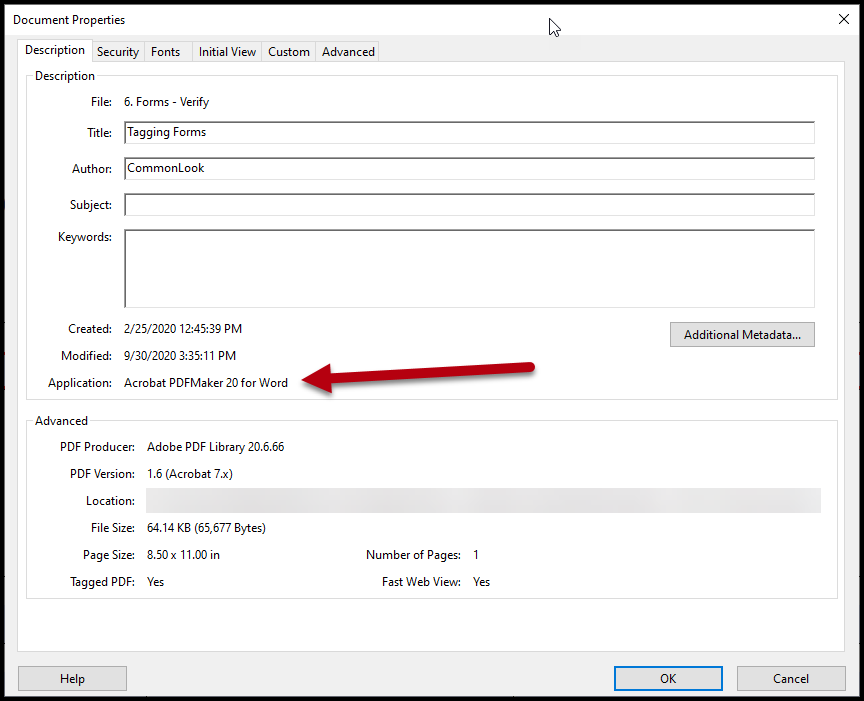
Check the metadata (Document Properties) in Acrobat.
Follow these steps:
- Navigate to File in the toolbar and choose Properties (or use the keyboard shortcut Ctrl+D),
- Go to the Description tab in the Document Properties window (it's the first tab),
- From there, check the "Application" that created the document. If it says "LiveCyle" you know its a LiveCycle form. If it doesn't, it's not. In the screenshot below you'll notice that the form came from Microsoft Word, for example. (Note: Adobe "LiveCycle" may have changed its name to "Designer" or "Forms Designer" so be on the lookout for either of those things, too!)
Was this article helpful?
That’s Great!
Thank you for your feedback
Sorry! We couldn't be helpful
Thank you for your feedback
Feedback sent
We appreciate your effort and will try to fix the article