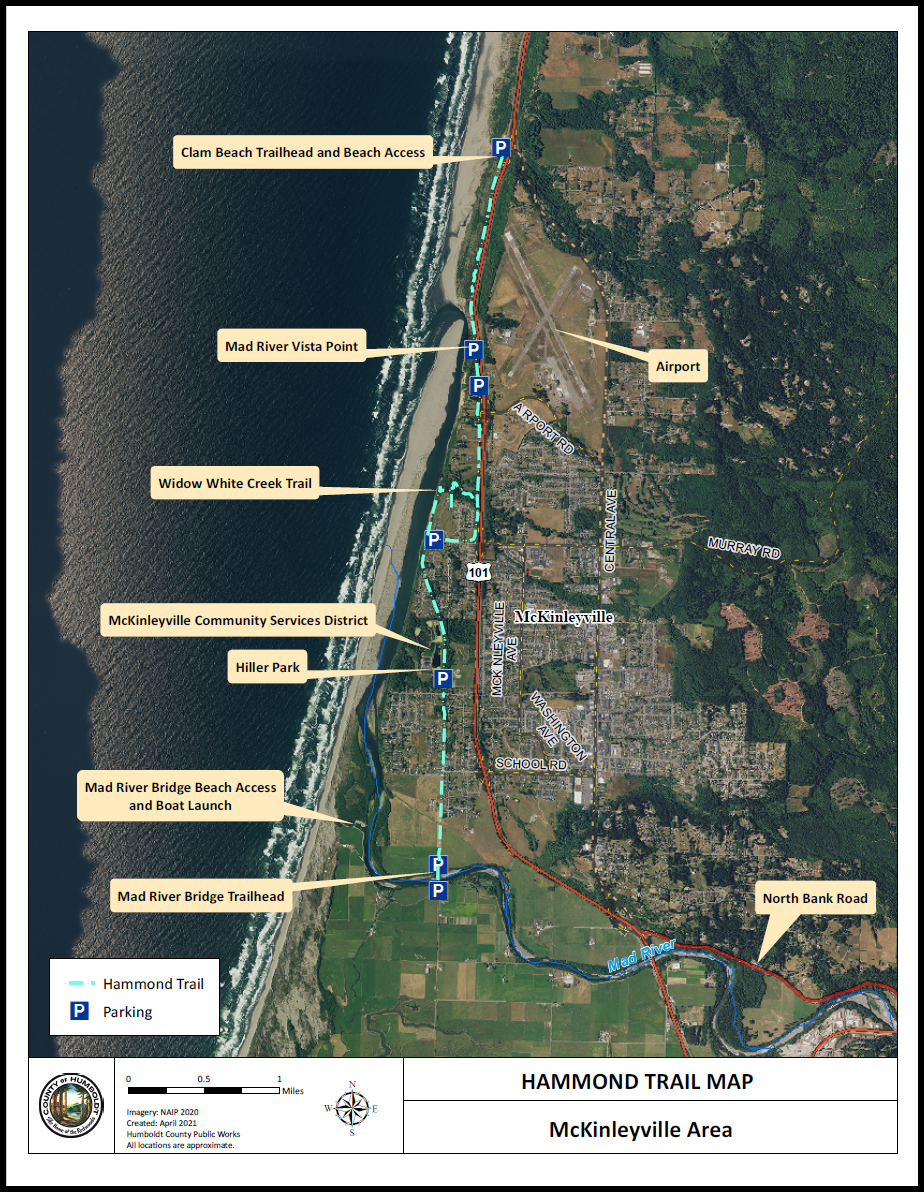
In a situation where we must tag a highly-visual piece of content, a remediator's options are sometimes quite limited. Some of the most common examples of this are structural or architectural plans, as well as maps. Let's use a map as an example.
Author Intent
One of the most important first steps when deciding how to handle a map like this one, is figuring out what the author wishes to share with this content. For example, if the author just wants to indicate that the Hammond Trail runs North to South along the western coast, then that info could likely be placed into Alt text on a Figure tag and be considered acceptable.
If the author added the map as a purely decorative piece of content, it could even be untagged.
However, if the author wants the reader to understand the specific segments of the trail, the naming of each trail section and trailhead, and what parking locations corespond with which trail sections, that is not something easily conveyed through Alt text, so this would need to be addressed in a different way. If this is the situation, the following section will highlight the best approach to tagging the content.
Tagging Map Sections Individually
The best way to give as much detail as possible to a map like this is to group sections of it together and tag them accordingly.
Note: You might need to adjust your selection settings in order to select some of this content, and in some cases, might even need to run OCR to be able to select it at all. This is document-specific, but once done, CommonLook can enable you to do the rest.
For example, the "Clam Beach Trailhead and Beach Access" text could be tagged as a heading, and be directly followed by a Figure tag that includes the nearest Parking symbol, and perhaps some of the dotted line showing the trail. This Figure tag could then be given Alt text that explains that particular section of the map. What the remediator chooses to add to the Alt text could reflect their understanding of what the author intended to indicate with that section of the map.
In this example, something like "Map of Hammond Trail shown in a dashed blue line, running North to South from Clam Beach to the Mad River Bridge. The north trailhead begins at the clam beach parking lot. The trailhead is located at the north end of the Central Avenue in McKinleyville and runs parallel to the ocean, the Mad River and CA route 101. The following figures will display various features along the Hammond trail running north to south" could even be appropriate.
The next tag could be another heading, including the "Mad River Vista Point" text, followed by a Figure tag including some of the nearby graphical elements. The Alt text on this Figure could be something like, "Approximately a mile and a half south of the clam beach trailhead is the Vista point showing a great view of the mouth of the Mad River. This vista point is directly across from CA Route 101 and the Arcata/Eureka Airport. An alternative parking lot is available less then a quarter mile south of the vista point. This parking and can be accessed at the north end of Airport Road."
Important points to make are where we are on the map in relation to the last piece of described content, as this will all allow readers to "paint the picture" of the map itself.
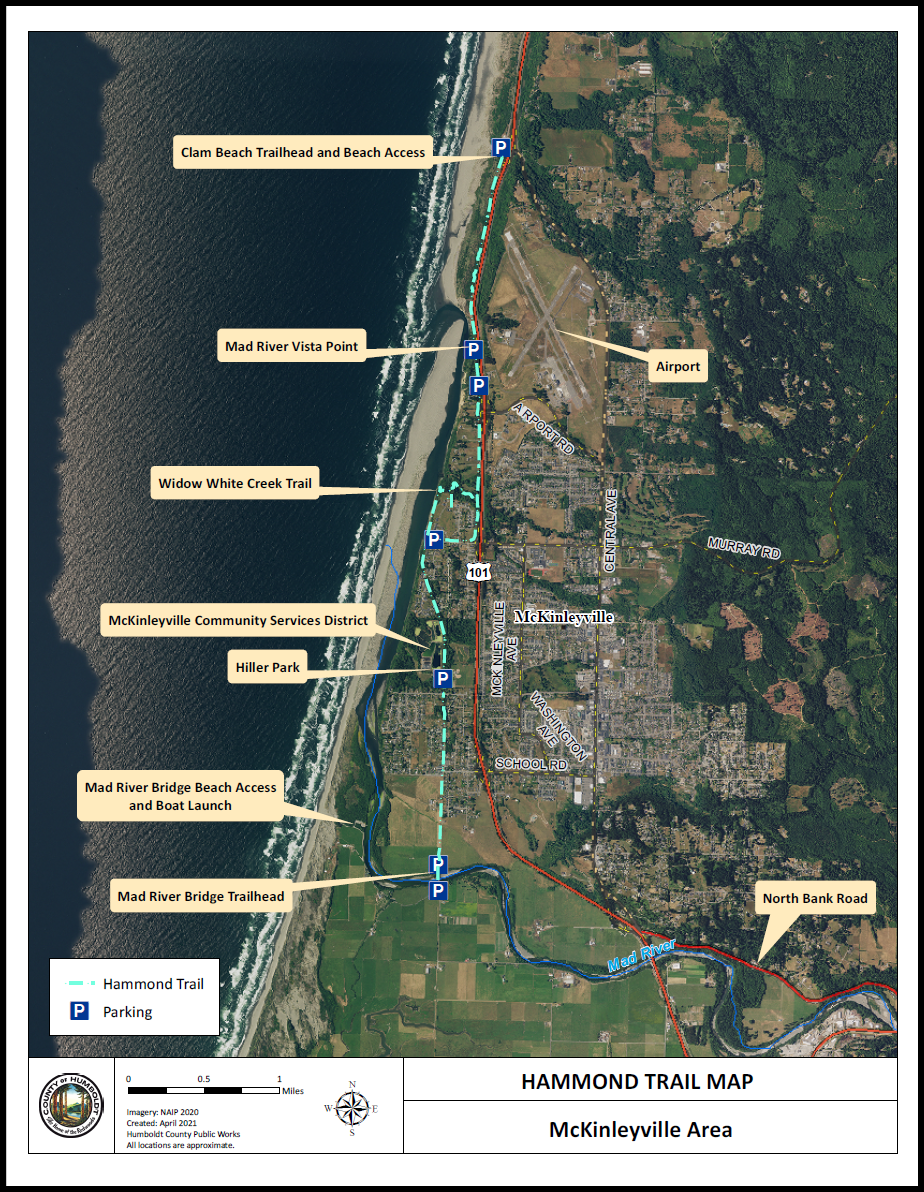
Every document is unique, and every graphic like this will create its own set of steps and solutions. If you want to dig deeper into this specific example, we have attached this Hammond Trail Map in a completely downloadable, remediated PDF at the bottom of this article.
Didn't find what you're looking for? Navigate to our "Images, Graphics, & Figures" section for more related articles that may help!
Was this article helpful?
That’s Great!
Thank you for your feedback
Sorry! We couldn't be helpful
Thank you for your feedback
Feedback sent
We appreciate your effort and will try to fix the article