Forms CommonLook Office supports
Legacy forms: The best option for fillable fields in PDF (not available in PowerPoint)
Content Controls: Will become “flattened” (not fillable) in the PDF
- ActiveX Controls: Will become fillable fields in the PDF but are significantly harder to use and the “look and feel” isn’t very “ideal” (not available in PowerPoint)
What CommonLook Office does
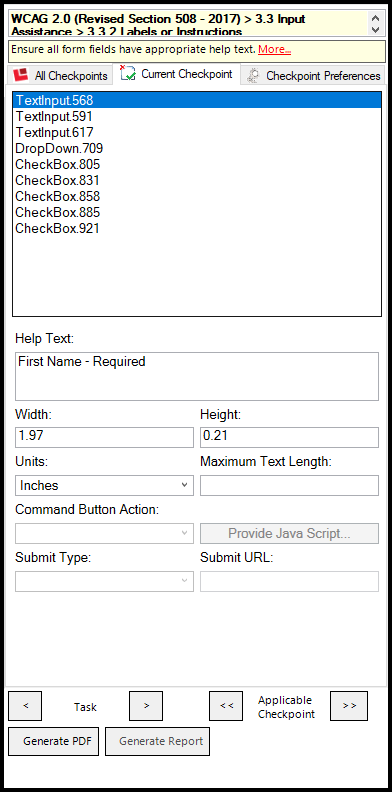
When you add your form fields in Word and you run CommonLook Office, the checkpoint will run asking you to provide the following:
Help Text: This is required. It becomes the “tooltip” in the PDF so that people using screen readers and other assistive technologies know what the question is that’s being asked. Important: Make sure it’s sufficiently informative so that some one knows, without any other contextual clues, what the question is!
- Width/ Height/ Units: Optional to adjust here to set the size of the form field in the PDF
- Maximum Text Length: For text fields. To limit the number of characters that can be entered.
- Command Button Action: If a Command button has been used. But that’s not an option with Legacy forms.
- Provide JavaScript: Optional
- Submit Type/ Submit URL: If a Submit button is used (not an option in Legacy Forms)
Form requirements - new in WCAG 2.2
There is a "target size" requirement that's new in WCAG 2.2 that may apply to forms in your documents.
For more information about this requirement, please check out the "Target Size" article. Or, check out our other articles pertaining to Forms in CommonLook Office.
Was this article helpful?
That’s Great!
Thank you for your feedback
Sorry! We couldn't be helpful
Thank you for your feedback
Feedback sent
We appreciate your effort and will try to fix the article