Product
Advanced Editor (Web-based CL PDF)
Feature
Lists
Document Element
List Numbering (the ListNumbering attribute on the List (L) tag, including nested lists)
Overview
CommonLook PDF Desktop tags each list with a List (L) tag. The ListNumbering attribute on that tag tells assistive technology how the list is actually numbered or bulleted, so a screen reader announces list items correctly and the tagging matches WCAG 2.x Success Criterion 1.3.1 (Info and Relationships). ListNumbering is required for ordered lists and recommended for unordered (bulleted) lists.
Generate List from Selection usually assigns ListNumbering for you automatically. During Verification, though, you may still be asked to assign or confirm the value by hand — most often for nested lists, each of which needs its own ListNumbering value.
Here is a brief explanation of the ListNumbering options:
- Disc - when you have a bulleted list and the bullets are solid circles
- Circle - when you have a bulleted list and the bullets are open circles
- Square - when you have a bulleted list and the bullets are squares
- None - for bulleted lists when the bullets don't match any of the previous descriptions OR for an ordered list that doesn't match any of the following descriptions
- Decimal - ordered lists numbered with Arabic numerals
- Upper (or lower) Roman - an ordered list that uses upper case (or lower case) Roman numerals
- Upper (or lower) Alpha - an ordered list that uses upper case (or lower case) letters
Prerequisites
Do this when:
- You've tagged a list, either by hand with List (L), List Item (LI), Lbl, and LBody tags, or with Generate List from Selection.
- Verification flags an ordered list with no ListNumbering value.
- You want to confirm that an already-set ListNumbering value actually matches how the list displays.
- The list has nested sub-lists — each one needs its own ListNumbering value checked separately.
Steps to Follow
- In the Tags tree, select the List (L) tag for the list you want to set or check.
- Open the Properties panel for that tag.
- Find the ListNumbering field and compare it to how the list actually displays on the page.
- Set ListNumbering to match the visual style:
- Ordered lists: Decimal, UpperRoman, LowerRoman, UpperAlpha, or LowerAlpha
- Unordered (bulleted) lists: Disc, Circle, Square, or None (when the bullet shape doesn't match any of those)
- If the list has nested lists inside it, select each nested List (L) tag in turn and repeat steps 2–4 — a parent list's ListNumbering value doesn't carry down to its children.
- Re-run Verification to confirm ListNumbering is set correctly for every list in the document.
Screenshots
The screenshot below shows a List tag selected in the Tags tree and the ListNumbering drop down displayed in the Properties panel.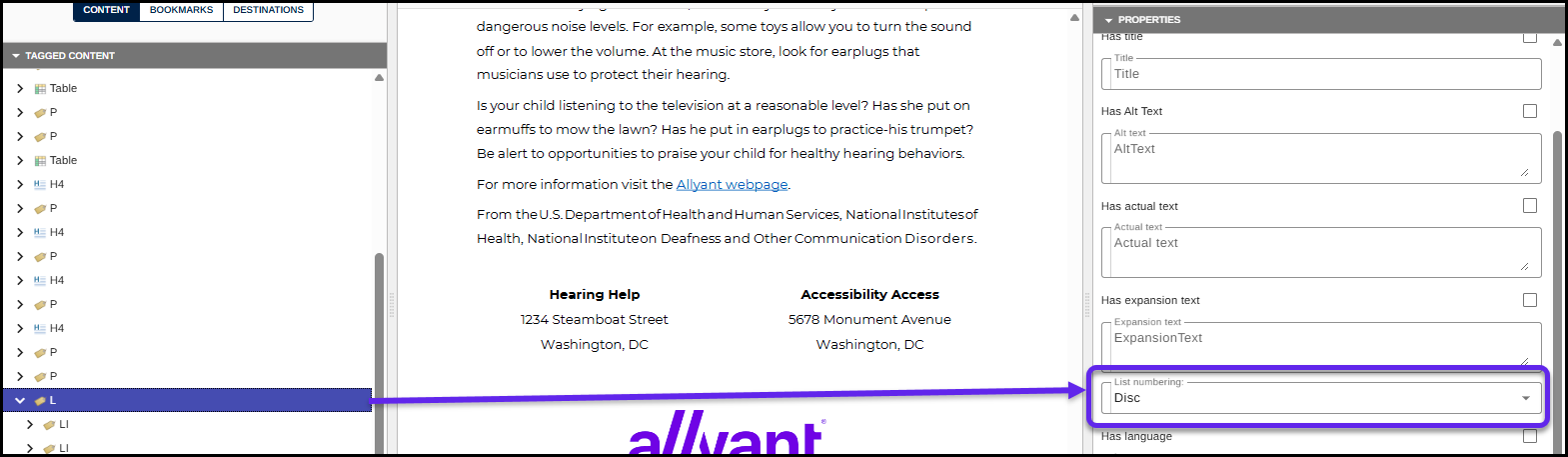
Common Problems
- Generate List from Selection usually sets ListNumbering automatically, but Verification can still ask you to confirm or assign it by hand — don't assume every list is already covered.
- ListNumbering set to a value that doesn't match how the list actually displays (for example, Decimal on a list that visually uses Roman numerals). This still fails WCAG 1.3.1 and PDF/UA's list-tagging requirement even though the attribute is present, because the tagging misrepresents the list.
- Nested lists left unset — only the outer list gets a value, and the inner list(s) get missed.
Frequently Asked Questions
Is ListNumbering required for every list?
It's required for ordered (numbered) lists and recommended for unordered (bulleted) lists. Leaving it off an ordered list fails WCAG 2.x SC 1.3.1 and the related PDF/UA list-tagging requirement.
Does CommonLook PDF Desktop ever set this for me?
Yes — Generate List from Selection usually assigns ListNumbering automatically. Verification will still prompt you to assign or confirm it when it can't determine the value, so check the Properties panel for any list Verification flags.
What value do I use for a bulleted list whose bullets don't look like a standard disc, circle, or square?
Use None.
Do nested lists need their own ListNumbering value?
Yes. Select each nested List (L) tag individually and set or verify ListNumbering for it — it isn't inherited from the parent list.
What happens if I leave ListNumbering blank or set it incorrectly?
Assistive technology can't reliably announce the list's numbering style, and the PDF will fail WCAG 1.3.1 Info and Relationships and PDF/UA's list-tagging requirement (Matterhorn Protocol Checkpoint 16) during accessibility verification.
Was this article helpful?
That’s Great!
Thank you for your feedback
Sorry! We couldn't be helpful
Thank you for your feedback
Feedback sent
We appreciate your effort and will try to fix the article