Product
Advanced Editor (Web-based CL PDF)
Feature
Dictionary Check for the HHS 2018 Accessibility Verification Check
Issue
In the HHS 2018 verification, you may have checkpoints A11 and / or I3 come up in your results, asking if text is correctly formatted, free from line breaks and split words) or if the language is appropriately set for foreign words or phrases. CommonLook PDF is also looking for misspelled words.
Symptom
This issue will only be seen if you use the HHS verification standard on a document that doesn't recognize unfamiliar words or words that are not present in the dictionary the application is using. The Failure will read: Unable to find "specific word" in the "en" dictionary. Please verify there aren't any missing spaces between words or other formatting issues.
Cause
The failure is triggered when you run your PDF through an HHS 2018 verification words are encountered that are not spelled like those in the dictionary the application is using.
Depending on the types of documents you work with, there may be words in the document that are spelled correctly but CommonLook PDF flags them. In instances like this, you can use the Fix Wizard to add these words to your dictionary so that, in future verifications, CommonLook PDF knows those words are actually spelled correctly!
Affected Users
All users would be affected by misspelled words, as they would be hard to visually read and know the intended meaning and screen reader users will hear the words mispronounced which can cause confusion.
Resolution Steps
- Open the Fix Wizard of the failure
- If the word is spelled correctly, add the Word to the Dictionary.
- Or choose on of the other options if you need to make changes.
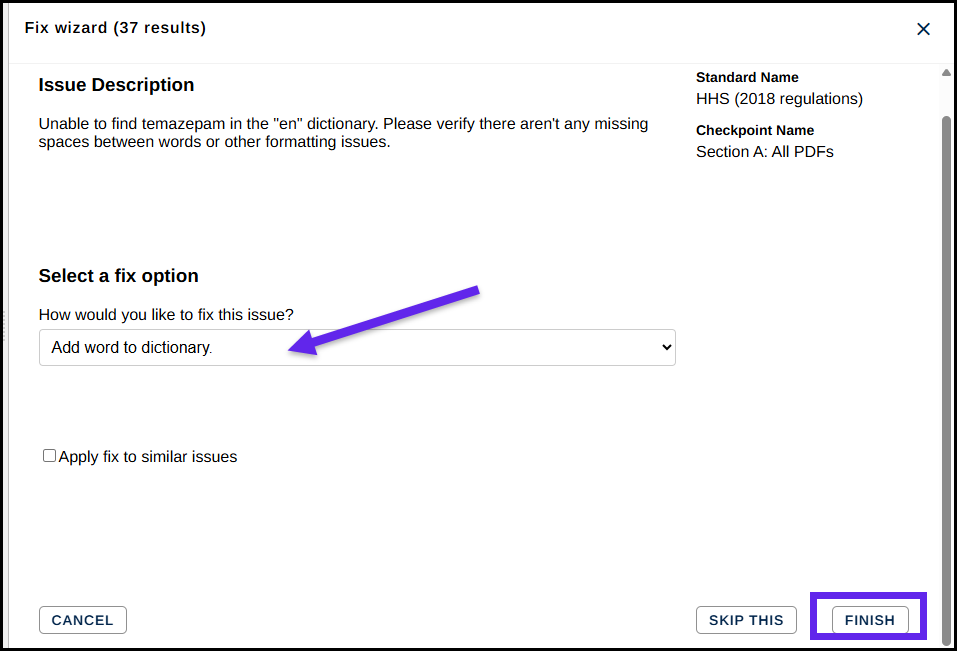
Once you have added a correctly spelled word to the dictionary, it will no longer be flagged when running the HHS verification.
Verification
You will know if this issue has been addressed in the PDF by running a HHS 2018 verification standard and no longer seeing failures for being unable to find words in the document in the dictionary.
Was this article helpful?
That’s Great!
Thank you for your feedback
Sorry! We couldn't be helpful
Thank you for your feedback
Feedback sent
We appreciate your effort and will try to fix the article