I can't copy and paste into Alt text (or other Properties fields)
If you can't copy and paste, using the desktop version of CommonLook PDF, it's more than likely that you have Protected Mode turned on in Adobe Acrobat. The message in CommonLook PDF tells you that "certain features will be limited."
Here is a list of those "limited features:"
- Copy / Paste is limited.
- Saving the compliance report is restricted, the user can save the report inside the documents folder.
- The application may not check the validity of Link target URLs properly.
- The Help section may look different in style, some content might not be available (e.g. Software Screenshots), users can check the help section throughout the website.
Failure to connect to the Update server / failure to activate your license
If you receive an error message that the software cannot connect to the Update server, or if you have issues activating the software during installation, it may be due to Protected Mode being turned on.
To turn off Protected Mode (if your organization allows that)
Please uninstall CommonLook PDF and follow the steps below to disable protected mode. Once protected mode is disabled, please re-install CommonLook PDF.
After uninstalling CommonLook PDF, follow these steps:
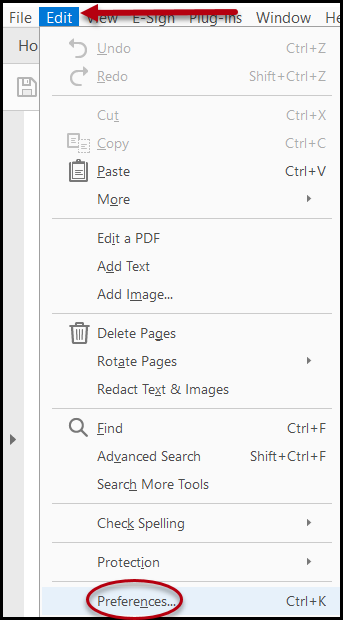
- In Acrobat, navigate to Edit (in the toolbar)
- Choose Preferences
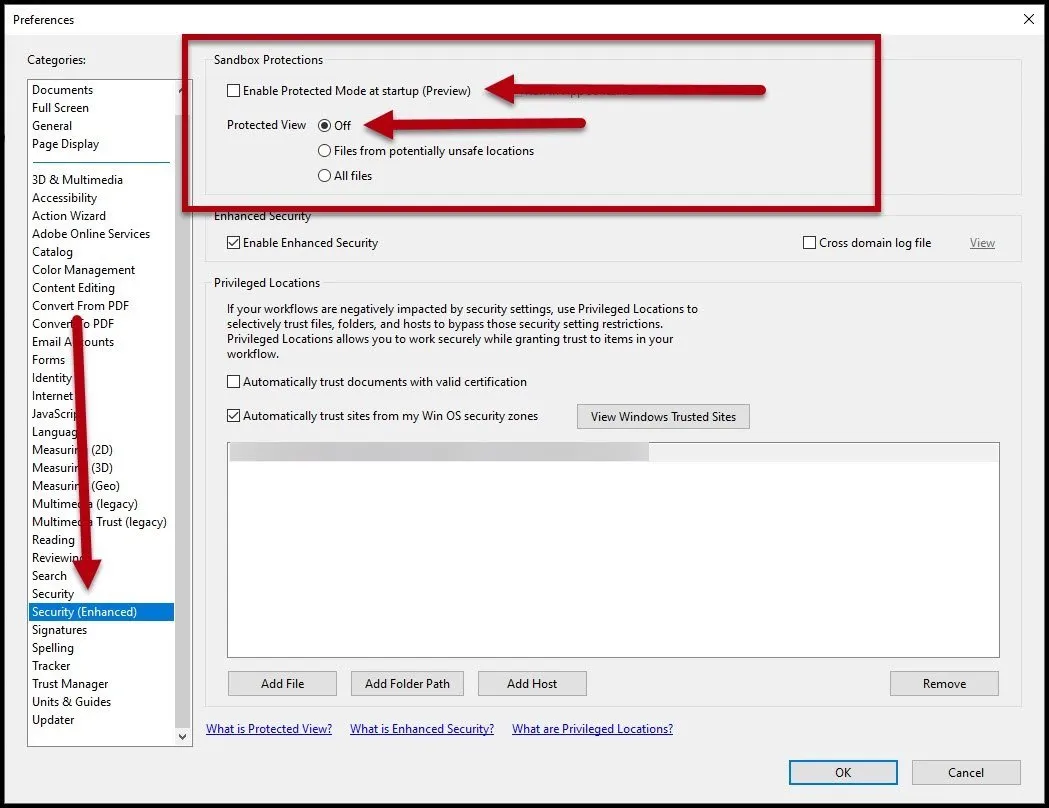
- In the left side of the Preferences dialog box, select Security (Enhanced)
- In the Sandbox Protections, uncheck “Enable Protected Mode at startup”
- In “Protected View,” choose the “Off” radio button (Please note the screenshot below if needed.)
- Press OK and close out of Acrobat.
- Reinstall CommonLook PDF.
- Re-open the PDF and CommonLook PDF.
Was this article helpful?
That’s Great!
Thank you for your feedback
Sorry! We couldn't be helpful
Thank you for your feedback
Feedback sent
We appreciate your effort and will try to fix the article