Table summaries supply valuable information that can clarify or complement the contents of any table. With that said, table summaries are not required by any standard. Because they are not required, you will never receive a Failure for not having them, but CommonLook will generate a result, bringing them to your attention.
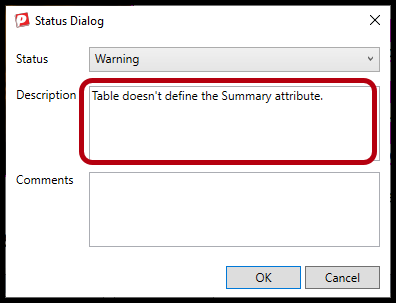
If you don't have a table summary, you will receive a Warning result stating that the "Table doesn't define the Summary attribute."
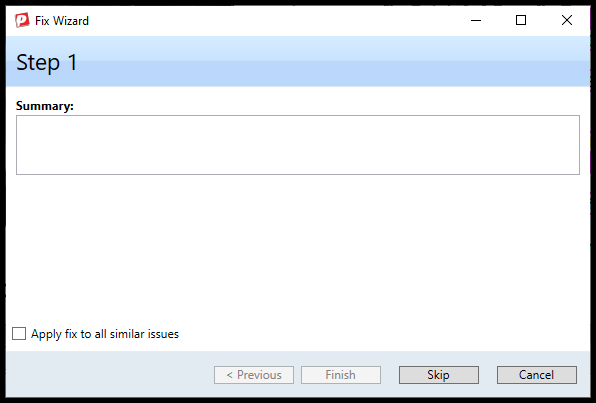
Should you choose to, you could add a table summary manually in the Properties of the Table tag, or by using the Fix Wizard (pictured below).
If providing a table summary, ensure it written well in terms of grammar, spelling, and capitalization. While you should always feel welcome to provide a table summary, there are a few reasons it might not be necessary. One of the most common reasons is that the table is simply not in need of it. The table could be relatively simple and easy to understand. Sometimes, tables have associated captions, which would make a summary a bit redundant. Whichever scenario applies to your table, the fact is that if we are going to change the result from a Warning to Passed, a comment can clarify our intent.
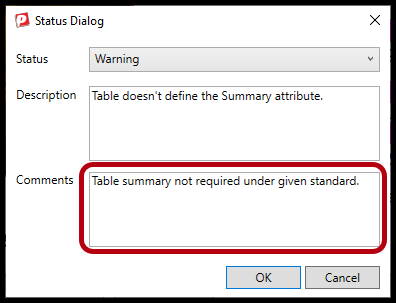
Some common comments could allude to the table's simplicity, the fact that the table has a caption already, or that the standard does not require one.
Didn't find what you're looking for? Navigate to our "Tables" section for more related articles that may help!
Was this article helpful?
That’s Great!
Thank you for your feedback
Sorry! We couldn't be helpful
Thank you for your feedback
Feedback sent
We appreciate your effort and will try to fix the article