When manually tagging a list using the steps described in the, "Manually Tagging a List," section of the "Tagging Lists" article, a more efficient way to tag the list bodies could have been to use the “Sticky Button” functionality. The steps below will outline how to use the Sticky Button functionality when tagging a list, however, users can apply the concept in other areas such as tagging paragraphs, table cells, and more! Using this tool will allow the user to efficiently create multiple of the same type of tag, one after the other. If the example below, a user would implement the Sticky Button tool to create all of the LBody tags, and simply rearrange them after creation. To do so, follow these steps:
- In the Insert tag tab, on the far left side, click the “Sticky Button” icon and then the LBody button (in the List group).

- Click the last Lbl tag in the Tags tree. Selecting this tag tells CommonLook to place the next tag created (an LBody) directly underneath it in the tree.
- In the physical view, highlight the text for the first LBody– in the case of our example, that is “Bosse Speakers.”
Note: Do not highlight the bullet because that has already been tagged in a Lbl tag. - Verify that an LBody tag containing the highlighted text was placed in the Tags tree directly under the Lbl tag that was selected in Step 2.
Tip: After creating the LBody, press the left arrow on the keyboard to close it. This helps keep the Tags tree a little neater and easier to organize.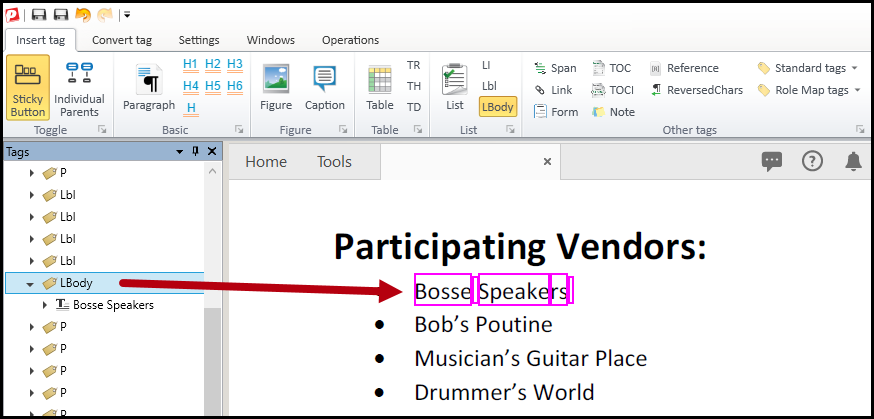
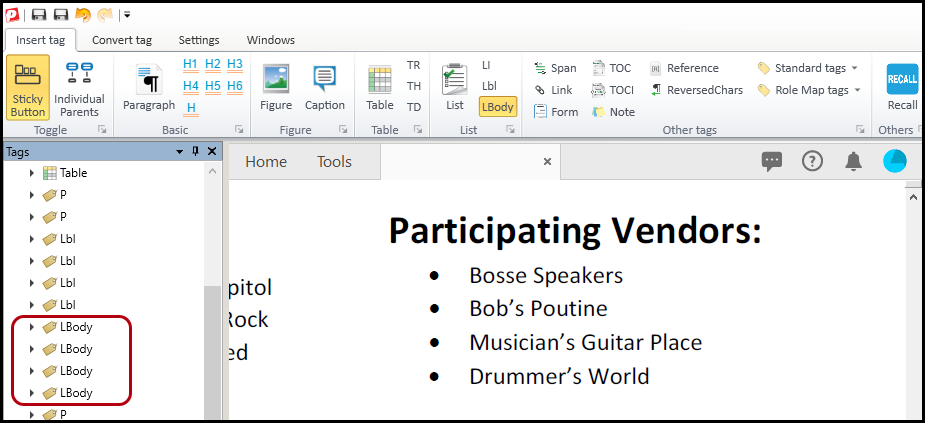
- In the physical view, continue individually highlighting each of the list items’ text (remember, not the bullets). Verify that three more LBody tags have been created and are visible in the Tags tree. As previously mentioned, pressing the left arrow on the keyboard after creating each LBody will help keep the Tags tree neater and more organized! The screenshot below shows the four LBody tags in the Tags tree.
- Click the “Sticky Button” icon again to turn the feature off.
- Continue working on the list, eventually correcting tag order and list structure.
Didn't find what you're looking for? Navigate to our "Lists" section for more related articles that may help!
Was this article helpful?
That’s Great!
Thank you for your feedback
Sorry! We couldn't be helpful
Thank you for your feedback
Feedback sent
We appreciate your effort and will try to fix the article