Product
Advanced Editor (Web-based CL PDF)
CommonLook PDF Desktop Version
Feature
Lists
Document Element
Tagging Nested Lists
Overview
A nested list is a list that has smaller sub-lists within it. Don't think of this as an entirely new tagging structure to learn — it's simply an addition to the structure you already use for a simple list.
Every properly tagged list is a List tag with one LI (list item) tag inside for each item shown in the physical view. Within each list item there's a Lbl (label) tag holding the marker (number, letter, bullet point, etc.) and an LBody containing the item's text.
A nested list is structured the same way — its own List tag (containing all of its parts) is placed inside the LBody that holds the "parent" item's text. In other words, a nested list's List tag becomes one more piece of content inside the parent item's LBody, alongside that item's text.
Prerequisites
Do this when:
- A list in the document has a sub-list inside one or more of its items, and it needs to be tagged (or its auto-generated tagging checked) so assistive technology reads the nesting correctly.
- You already know how to tag a simple list (List, LI, Lbl, LBody) — nested lists build directly on that structure.
Steps to Follow
- Tag the list using Generate Tag from Selection. CommonLook PDF will usually generate nested lists correctly on its own.
- Open the List tags in the Tags tree and verify the structure:
- The List tag at the top of the tree is the "main," or "parent," list, containing one LI tag for each top-level list item.
- Each LI tag contains a Lbl (label) and an LBody (body text).
- Wherever a list item has its own sub-list, that sub-list's entire List tag sits inside that item's LBody, alongside its text.
- The nested list follows the same LI → Lbl/LBody pattern as the main list.
- If the structure is correct, you're done — no further action needed.
- If CommonLook doesn't tag the whole nested list accurately, tag it in smaller parts and assemble the pieces:
- Auto-generate the nested list's parts on their own, then manually move them inside the correct LBody tag of the main list (after that LBody has been created).
- It's often easier to build the "main" list's parts first, then build (or fix) the nested list and place it inside the right LBody.
- If you need to manually tag the list, use Sticky Buttons and Individual Parents to speed things up — combining the two (for example, when creating a lot of Lbl tags) can save even more time.
Screenshots
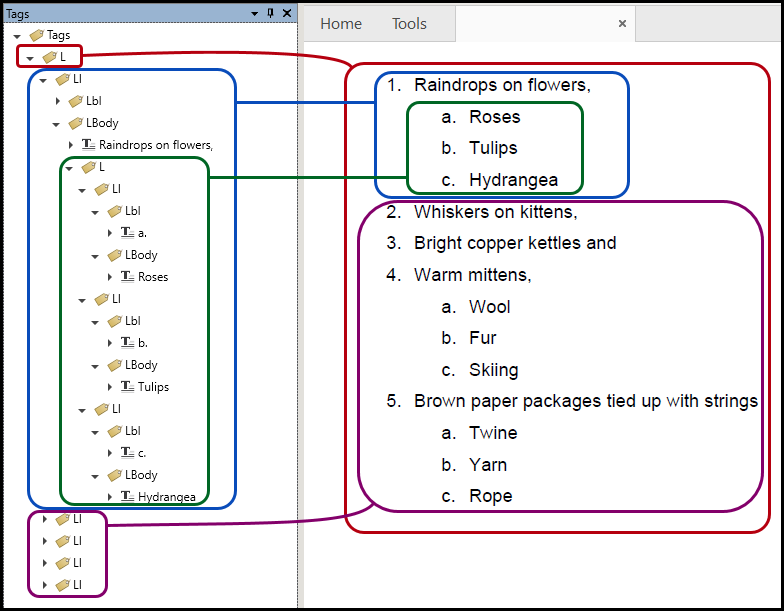
The image above illustrates the following details in creating the nested list:
- The List tag at the top of the Tags tree is the “main” List tag for the entire list and its nested parts. Some refer to this as the "parent list."
- As immediate “children” to this main List tag are five LI (list item) tags. These LIs correspond to the five “main” list items, numbers 1 through 5, in the physical view.
- The first of these List Item tags (and its LBody tag) is open, showing the text element, “Raindrops on flowers.”
- Inside the LBody tag, under the text element containing “Raindrops on flowers,” there is a List tag containing the nested list and its three list items.
- The nested list’s LI tags are also opened to show their label and LBody tags (corresponding to the three types of flowers).
- The nested list’s LBody tags are open to show the text inside each of them as displayed in the physical view of the list.
Common Problems
- Placing the nested List tag as a sibling of the parent item instead of inside that item's LBody.
- Assuming an auto-generated nested list is correct without opening it to check — always verify the structure.
- Trying to auto-generate a large, complex nested list in one pass when it doesn't tag correctly; breaking it into smaller parts and assembling them is often more reliable.
- Manually tagging without using Sticky Buttons or Individual Parents, which spends more time than needed.
Frequently Asked Questions
Does a nested list need a different tag structure than a regular list?
No. It uses the same List → LI → Lbl/LBody structure as any list — it's just placed inside the LBody of the parent item's List Item.
Where does the nested list's List tag go?
Inside the LBody tag of the "parent" list item it belongs to, alongside that item's text.
Will CommonLook tag nested lists correctly on its own?
Usually, yes, using Generate Tag from Selection — but always open the List tags afterward and confirm the structure is correct.
What if CommonLook doesn't tag the whole nested list correctly?
Try auto-generating smaller parts of the list separately, then manually assemble them — for example, generate the nested list's parts on their own and move them into the right LBody after it's created.
Are there tools that make manually tagging nested lists faster?
Yes — Sticky Buttons and Individual Parents, especially combined, can save time (for example, when creating many Lbl tags in a row).
!
Was this article helpful?
That’s Great!
Thank you for your feedback
Sorry! We couldn't be helpful
Thank you for your feedback
Feedback sent
We appreciate your effort and will try to fix the article