Product
Simplified Editor (Web-based CL PDF)
Feature
Unicode Mapping
Document Element
Handling Unicode Mapping Failures on the Validation Report
Issue
Your document has Unicode encoding issues that cannot be fixed inside the Simplified Editor. These issues are tied to the fonts used in the source PDF and must be addressed before or after remediation using a separate PDF editing tool.
Symptom
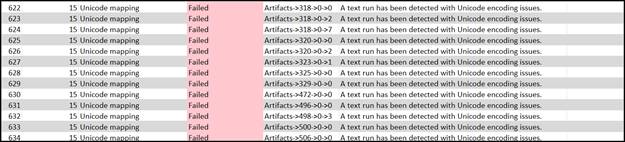
After completing your remediation project in the Simplified Editor, you receive an error message indicating that your document has Unicode or character encoding issues. This message appears in your verification report, at the end of the process, after all remediation work has already been completed.
Causes
Unicode encoding issues usually come from one of two things. Either the fonts used in the document cannot be mapped to Unicode, or the way the PDF was originally generated from a source file introduced encoding problems. Neither of these can be detected or corrected by the Simplified Editor during the remediation process.
Affected Users
All users are affected. Unicode encoding issues prevent text from being read correctly by any assistive technology, meaning the document cannot be considered accessible until the encoding is resolved.
Resolution Steps
Unfortunately, there is no fix available inside the Simplified Editor at this time. Resolving Unicode encoding issues requires working directly in a PDF editing tool to address the problem at the source.
There is an important thing to be aware of before proceeding: editing a PDF in an external tool after completing remediation in the Simplified Editor can undo your remediation work and require you to start over. We strongly recommend reading the full guide before taking any action.
For a complete walkthrough of your options, refer to the "What are Unicode Issues (Desktop and Advanced Editor)" article in the Knowledge Base.
We are actively working on a built-in fixing tool that will handle Unicode encoding issues directly inside the Simplified Editor. This article will be updated when that feature becomes available.
Verification
After addressing the encoding issues using a PDF editing tool, run your document through the Simplified Editor again. If the error message no longer appears at the end of the process, the encoding issues have been resolved.
Related Articles
Was this article helpful?
That’s Great!
Thank you for your feedback
Sorry! We couldn't be helpful
Thank you for your feedback
Feedback sent
We appreciate your effort and will try to fix the article