Product
CommonLook PDF Desktop Version
Feature
Verification (User Verification statuses/checkpoints)
Document Element
Actions — specifically the document's Open Action, but the same logic applies to actions on Bookmarks, links, and JavaScript
Issue
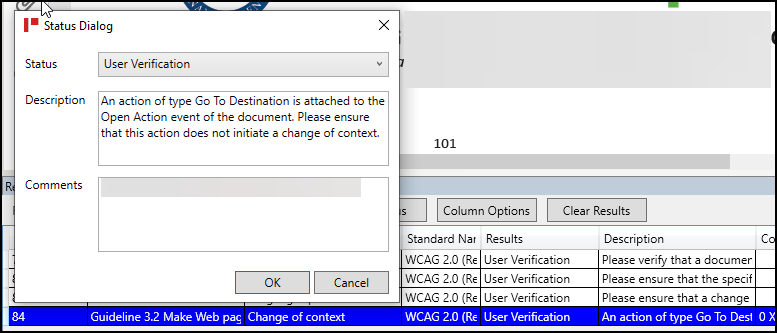
You receive a User Verification status during a verification in which CommonLook flags a checkpoint that references an "action" attached to something in the document, most commonly the document's Open Action, with a trigger type such as "Go To (a) Destination." The Description warns that this action "does not initiate a change of context," which can read as an alarming, technical warning even though in the vast majority of cases there's nothing actually wrong.
Symptom
During verification, a checkpoint appears with a Description mentioning an action (e.g., "Open Action") and a trigger like "Go To Destination," along with wording about not causing a "change of context." The item is unreviewed/needs a status, and its technical phrasing makes it look like a serious problem.
Causes
PDFs support "actions" in several places. Bookmarks use actions so that clicking one navigates to a page. Links and buttons can carry actions too. A document can also have an Open Action — something that fires the moment the file is opened, such as jumping to a specific page or setting a particular zoom/view level. JavaScript embedded in a document can trigger actions as well.
This checkpoint exists to confirm that none of these actions create an unexpected "change of context" for the person reading the document — for example, automatically jumping to a random page, silently reordering how content is presented, or otherwise doing something disorienting the moment the file is opened. That would be a genuine accessibility barrier. However, the checkpoint fires any time an Open Action (or similar action) is present at all, regardless of what it actually does — so most of the time it's just flagging something benign, like a default page/zoom setting, not an actual problem.
Affected Users
Screen reader users and users with cognitive or attention-related disabilities are the primary group at risk if an action did cause a real, unexpected change of context — an unannounced jump or reorder can be disorienting or cause someone to lose their place. Low vision users could also be affected if a magnification change happened unexpectedly. In the typical case described here, no one is actually affected, since nothing unexpected is occurring.
Accessibility Guidelines
- WCAG 2.x — Success Criterion 3.2.1: On Focus
- WCAG 2.x — Success Criterion 3.2.2: On Input
- WCAG 2.x — Success Criterion 3.2.5: Change on Request (AAA) — the general "changes of context should only happen when the user asks for them" principle this checkpoint is built on
- ISO 14289-1 (PDF/UA-1), Clause 7.18.3 — Actions
- Matterhorn Protocol (PDF Association) — Actions checkpoint, the practical PDF/UA test suite this CommonLook verification item is drawn from
Resolution Steps
- Open (or re-open) the document and pay attention to what happens the moment it loads.
- Confirm nothing unexpected occurs — e.g., the document does not jump to an unrelated page (such as page 65), does not reorder pages, and does not change the meaning or presentation of the content.
- If the only thing that happens is something ordinary, like the page displaying at "Fit Page" or a set zoom/magnification level, that's expected and not a problem.
- If the document contains JavaScript and a similar checkpoint appears for it, apply the same test: does running it produce anything unexpected or disorienting?
- If nothing "weird" happens in either case, no remediation is needed.
Verification
Change the checkpoint's Status to Passed, since the Open Action (or JavaScript action) is not initiating an unexpected change of context. Re-run verification to confirm the item now shows as Passed and no other related checkpoint is affected.
Was this article helpful?
That’s Great!
Thank you for your feedback
Sorry! We couldn't be helpful
Thank you for your feedback
Feedback sent
We appreciate your effort and will try to fix the article